We also make a cloud product under this name. This is not it.  Use that one and you are uploading on purpose.
Free·Apache-2.0·Windows 10 and 11·No account

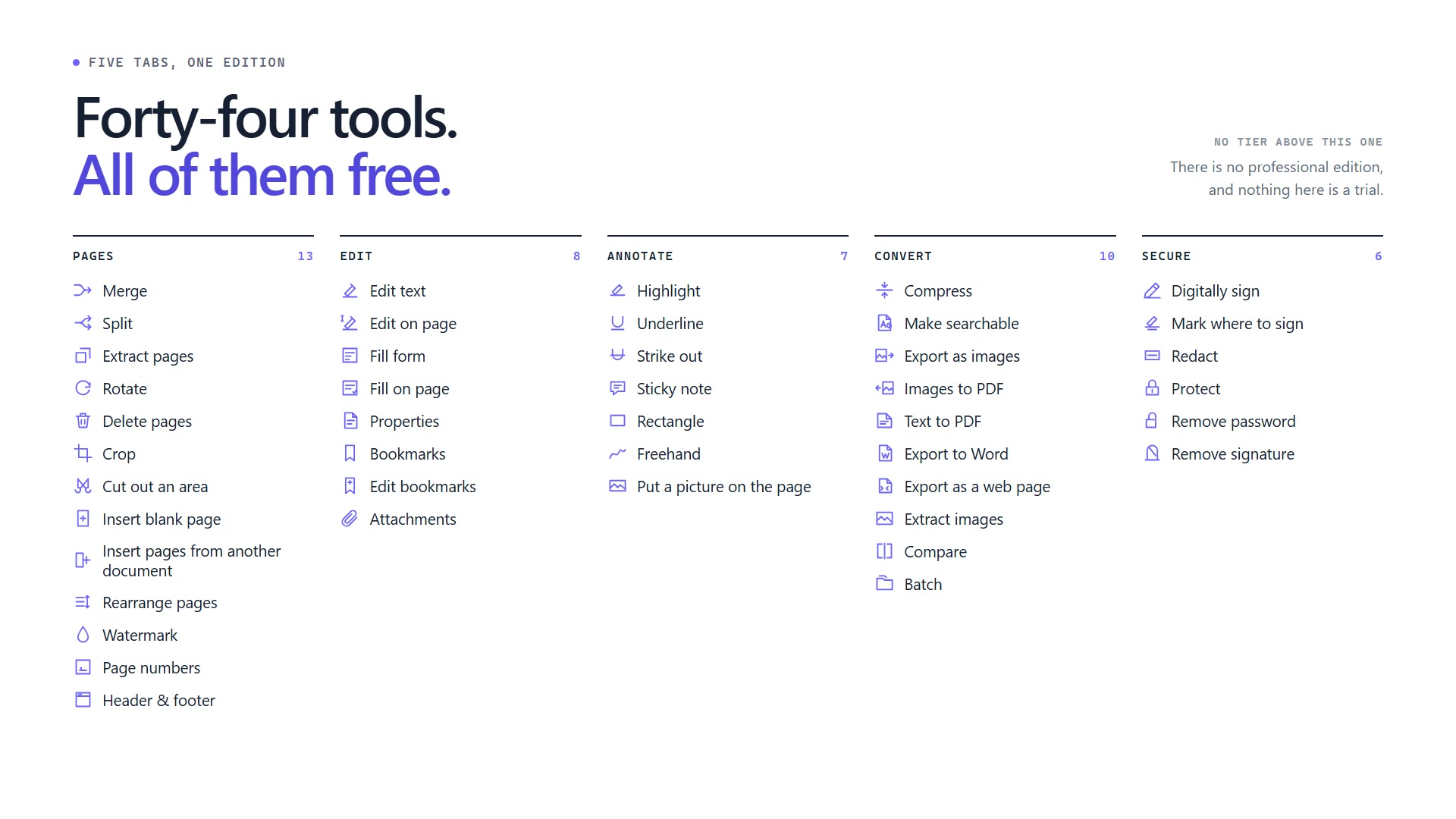
Thirty-six document tools. Not one of them sends your file anywhere.

This application has no server. There is no account, no sync, and nothing in it that sends a document anywhere. There is no code in it that makes a network request — the build asserts it, and the assertion and the source are both public.
Free forever. No trial, no watermark, no upgrade prompt.
Signed and installable today. The Microsoft Store listing is not submitted yet.
statement-2026.pdf — 14 pages
HomePagesEdit AnnotateConvertSecure
Merge
Split
Extract
Rotate
Delete
Compress
Pages
Fit to a size band
Compress
engine pdfium 154.0.8021 · worker pid 8321 · never loaded in this process
36
Tools in
the window
43
Command-line
commands
665
Tests in
the build
0
Network calls
in our code
₹0
Now, and at
every page count
§ 01  Everything it does

All thirty-six, on one page.

No tool is behind a paywall, a sign-up or a page count. There is nothing to upgrade to. Redaction is deliberately absent — see § 06.

Pages 10 tools
Merge
Combine open documents in the order listed
Split into pages
One rebuilt file per page
Extract pages
A new document from the pages you pick
Rotate
Lossless, selection or whole document
Delete pages
Rebuilt, so what you removed is gone
Crop
Drag the area to keep on any page
Insert blank page
An empty A4 page where you need one
Watermark
Drawn under the content, hides nothing
Page numbers
Six positions, padding and offsets
Header and footer
Three fields, with date and page tokens
Edit 8 tools — on the page itself, not in a dialog
Edit text
Change a line and apply it
Edit on the page
Click a line and type where it sits
Fill form
Through the PDF’s own form layer
Fill on the page
Fields drawn where they actually sit
Properties
What the file says about itself
Bookmarks
The outline, click one to go there
Edit bookmarks
Replace the outline, row by row
Attachments
Files carried inside the document
Annotate 6 tools
Highlight
Drag across the words
Underline
Drag across the words
Strike out
Drag across the words
Sticky note
Type it, then click where it belongs
Rectangle
Drag on the page, queued until applied
Freehand
Draw with the mouse or a pen
Convert 8 tools
Compress
To a size band, with a floor
Make searchable
OCR on this machine. English + Hindi
Export as images
One PNG per page, at your DPI
Images to PDF
Photos and scans, one page each
Export to Word
Text and paragraphs only. Not layout
Extract images
JPEGs copied out untouched
Compare
By words and by pixels, side by side
Batch
One operation over a whole folder
Secure 4 tools, and one deliberate absence
Digitally sign
Windows store, or a DSC USB token
Protect
AES-256, with a password to open
Remove password
On a document you can already open
Remove signature
When an edit has invalidated one
Redaction
Deliberately not shipped. Highlighting is not redaction, and we would rather be late than be the tool somebody was de-redacted with.
§ 02  The proof you can run in five seconds

Turn on airplane mode. Everything still works.

That is the whole test, and you do not have to take our word for any part of it. There is exactly one exception, and here it is rather than in a footnote:

The one exception

The optional timestamp on a digital signature asks a public time authority to attest the hour. It sends a hash, never your document, and it does nothing unless you turn it on. It is off by default, and the switch is in plain sight.

One outbound request, by your choice, carrying no document.

What we will not tell you

We do not claim this application cannot reach the network. Windows does not let an ordinary desktop application permanently give up network access, so anyone who tells you their Windows app is incapable of it is telling you something they cannot back.

No mechanism claim. Only what the code does, and what you can check.
§ 03  Size bands, with their sources attached

Indian portals want a band, not a ceiling.

NEET wants a certificate between 50 KB and 300 KB — squeeze it to 40 KB and it is rejected just as firmly as at 400 KB. So compression here targets a floor as well as a ceiling. And every preset carries where its numbers came from, because we checked and the numbers on other sites are wrong about as often as they are right.

AuthorityDocument BandWhere the number comes from
NTA — NEET UGCertificate (PDF) 50–300 KB Verified
NEET UG 2026 information bulletin, read directly: “between 50 kb to 300 kb”.
Income Tax e-filingAttachment up to 5 MB Verified
Income Tax e-filing FAQ: optimise attachments exceeding 5 MB.
UPSCPhotograph (JPEG) 20–200 KB Unverified
Traced only to coaching-site summaries of the UPSC notice, not to the notice itself.
Check this against the current UPSC notice before you rely on it.
SSCSignature (JPEG) 10–20 KB Unverified
Coaching-site summaries; the SSC notice PDF was not retrieved.
Check this against the current SSC notice before you rely on it.

Four presets today. A portal gets a preset when somebody has read the authority’s own notice — not before.

§ 04  The part nobody else mentions

Delete a page in most tools and the page is still in the file.

The PDF format lets a writer append changes and leave every original byte in place. Cover a salary figure, remove a page, redact a name — if the tool appends, the original is still in the file you send, and any text extractor gets it back.

Incremental save — the common default

REVISION 1 · REVISION 2 · REVISION 3 — all delivered

Looks perfect in a viewer. The removed content is still there, chained through /Prev.

What you removed, you still sent.

What this application does instead

ONE REVISION — the file is rebuilt

The flag is never passed and is not exposed anywhere. After writing, we re-read our own output and refuse to hand back bytes that contain more than one revision.

Countersigning is the one checked exception, and it says so when it happens.
§ 05  Where your document is actually opened

No PDF is parsed in the window you are looking at.

Every file you open is attacker-controlled — it came from a portal, an employer, or a stranger. So the parser never runs beside your interface.

Process A
The window you clicked

Draws the interface. Holds your file list. Never maps the PDF engine at all — and prints a self-check saying so.

Process B — confined, disposable
The worker

Started inside a Windows job object with process mitigations, handed the bytes, and taken down afterwards. The only place PDFium is ever mapped.

402/424
Samples with the engine in the worker,
during a real 4,000-page split
0/424
Samples with the engine in
the front end
10/18
PDFium CVEs this year that were
use-after-free — which is why we build
the engine ourselves, with the allocator
hardening left on
§ 06  What this does not do

The page our competitors do not have.

Every one of these is a reason someone will choose another tool. They are here because finding them out after you install is worse.

  • No redaction
    There is no redaction tool, and highlighting is not redaction. Shipping it early and having somebody publicly recover what they thought they had removed is the failure we are least willing to risk. It is deferred, not hidden.
  • Word export loses layout
    Export to Word gives you text and paragraphs. Layout, tables and images are not preserved. If you need a faithful conversion, this will disappoint you.
  • No mechanism guarantee
    We cannot make Windows enforce the network boundary for an ordinary desktop application, and we do not claim otherwise. What we claim is what our code does, and that is checkable.
  • Windows crash reports
    We collect no telemetry. But Windows itself reports crashes to Microsoft, and a Store listing shows us anonymous crash counts. Neither is something we can switch off, so we say so instead of implying a cleaner picture.
  • Android is not released
    An Android application is in progress and not shipped. When it lands, its privacy claim will actually be stronger than the desktop one and checkable by you — the package declares no internet permission, and you can read that yourself.
  • The name may change
    “Creasepoint” is a working name pending trademark clearance. If it changes, this site changes with it.